21 KiB
Viewing elfeed entries in a PDF viewer
Intro
elfeed is one of the most popular packages in Emacs, and it's also one in which I ended up investing a lot of effort. I wrote about the EMMS integration and even made a custom frontpage to my liking. Among my other experimentations is integrating elfeed with Vosk to get automatic transcripts of podcasts, which may result in another blog post if I like the results.
However, this time I want to I want to share a bunch of tricks that I've found to greatly improve my RSS experience, namely:
rdrview
rdrview is a command-line tool to strip webpage from unnecessary clutter, extracting only parts related to the actual content. It's a standalone port of the corresponding feature of Firefox, called Reader View.
It seems like the tool isn't available in a whole lot of package repositories, bit it's pretty easy to compile. I've put together a Guix definition, which maybe one day I'll submit to upstream.
Integrating rdrview with Emacs
Let's start by integrating rdrview with Emacs. In the general case, we want to fetch both metadata and the actual content from the page.
However, the interface of rdrview is bit awkward in this part, so we have the following options:
- call
rdrviewtwo times: with-Mflag to fetch the metadata and without it; - call
rdrviewwith-Tflag to append the metadata to the resulting HTML.
I've decided to go with the second option. So, here is a function that calls rdrview with the required flags:
(defun my/rdrview-get (url callback)
  "Get the rdrview repesentation of URL.

Call CALLBACK with the output."
  (let* ((buffer (generate-new-buffer "rdrview"))
         (proc (start-process "rdrview" buffer "rdrview"
                              url "-T" "title,sitename,body"
                              "-H")))
    (set-process-sentinel
     proc
     (lambda (process _msg)
       (let ((status (process-status process))
             (code (process-exit-status process)))
         (cond ((and (eq status 'exit) (= code 0))
                (progn
                  (funcall callback
                           (with-current-buffer (process-buffer process)
                             (buffer-string)))
                  (kill-buffer (process-buffer process))) )
               ((or (and (eq status 'exit) (> code 0))
                    (eq status 'signal))
                (let ((err (with-current-buffer (process-buffer process)
                             (buffer-string))))
                  (kill-buffer (process-buffer process))
                  (user-error "Error in rdrview: %s" err)))))))
    proc))
The function calls callback with the output of rdrview. Generally, it doesn't take much time, but it's still nice to avoid freezing Emacs that way.
Now, we have to parse the output. The -T flag put the title in a <h1> flag and the name of the site in a <h2> flag and the content in a <div>. What's more, headers of the content are often shifted, e.g. the top-level header may well end up being and <h2> or <h3>, which does not look great in LaTeX.
With that said, here's a function that does the required changes:
(defun my/rdrview-parse (dom-string)
  (let ((dom (with-temp-buffer
               (insert dom-string)
               (libxml-parse-html-region (point-min) (point-max)))))
    (let (title sitename content (i 0))
      (dolist (child (dom-children (car (dom-by-id dom "readability-page-1"))))
        (when (listp child)
          (cond
           ((eq (car child) 'h1)
            (setq title (dom-text child)))
           ((eq (car child) 'h2)
            (setq sitename (dom-text child)))
           ((eq (car child) 'div)
            (setq content child)))))
      (while (and
              (not (dom-by-tag content 'h1))
              (dom-search
               content
               (lambda (el)
                 (when (listp el)
                   (pcase (car el)
                     ('h2 (setf (car el) 'h1))
                     ('h3 (setf (car el) 'h2))
                     ('h4 (setf (car el) 'h3))
                     ('h5 (setf (car el) 'h4))
                     ('h6 (setf (car el) 'h5))))))))
      `((title . ,title)
        (sitename . ,sitename)
        (content . ,(with-temp-buffer
                      (dom-print content)
                      (buffer-string)))))))
Using rdrview from elfeed
Because I didn't find a smart way to advise the wanted behaviour into elfeed, here's a modification of the elfeed-show-refresh--mail-style function with two changes:
- it uses
rdrviewto fetch the HTML; - it save the resulting HTML into a buffer-local variable (we'll need in later).
(defvar-local my/elfeed-show-rdrview-html nil)

(defun my/rdrview-elfeed-show ()
  (interactive)
  (unless elfeed-show-entry
    (user-error "No elfeed entry in this buffer!"))
  (my/rdrview-get
   (elfeed-entry-link elfeed-show-entry)
   (lambda (result)
     (let* ((data (my/rdrview-parse result))
            (inhibit-read-only t)
            (title (elfeed-entry-title elfeed-show-entry))
            (date (seconds-to-time (elfeed-entry-date elfeed-show-entry)))
            (authors (elfeed-meta elfeed-show-entry :authors))
            (link (elfeed-entry-link elfeed-show-entry))
            (tags (elfeed-entry-tags elfeed-show-entry))
            (tagsstr (mapconcat #'symbol-name tags ", "))
            (nicedate (format-time-string "%a, %e %b %Y %T %Z" date))
            (content (alist-get 'content data))
            (feed (elfeed-entry-feed elfeed-show-entry))
            (feed-title (elfeed-feed-title feed))
            (base (and feed (elfeed-compute-base (elfeed-feed-url feed)))))
       (erase-buffer)
       (insert (format (propertize "Title: %s\n" 'face 'message-header-name)
                       (propertize title 'face 'message-header-subject)))
       (when elfeed-show-entry-author
         (dolist (author authors)
           (let ((formatted (elfeed--show-format-author author)))
             (insert
              (format (propertize "Author: %s\n" 'face 'message-header-name)
                      (propertize formatted 'face 'message-header-to))))))
       (insert (format (propertize "Date: %s\n" 'face 'message-header-name)
                       (propertize nicedate 'face 'message-header-other)))
       (insert (format (propertize "Feed: %s\n" 'face 'message-header-name)
                       (propertize feed-title 'face 'message-header-other)))
       (when tags
         (insert (format (propertize "Tags: %s\n" 'face 'message-header-name)
                         (propertize tagsstr 'face 'message-header-other))))
       (insert (propertize "Link: " 'face 'message-header-name))
       (elfeed-insert-link link link)
       (insert "\n")
       (cl-loop for enclosure in (elfeed-entry-enclosures elfeed-show-entry)
                do (insert (propertize "Enclosure: " 'face 'message-header-name))
                do (elfeed-insert-link (car enclosure))
                do (insert "\n"))
       (insert "\n")
       (if content
           (elfeed-insert-html content base)
         (insert (propertize "(empty)\n" 'face 'italic)))
       (setq-local my/elfeed-show-rdrview-html content)
       (goto-char (point-min))))))
That way, calling M-x my/rdrview-elfeed-show replaces the original content with one from rdrview.
How well does it work?
Rather ironically, it works well with sites that already ship with a proper RSS, like Protesilaos Stavrou's or Karthik Chikmagalur's blogs, or The Atlantic maganize.
From other my subscriptions, it does a pretty good job with The Verge, which by default sends entries truncated by the words "Read the full article". For Ars Technica, it works only if the story is not large enough, because otherwise the site returns its HTML-based pagination interface.
For paywalled sites, like New York Times or The Economist, it usually doesn't work (by the way, what's the problem with providing individual RSS feeds for subscribers?). If you want stuff like that, I'd advise using the RSS-Bridge project. And if something is not available, contributing business logic there definitely makes more sense than implemeting workarounds in Emacs Lisp.
LaTeX and pandoc
However, I find that I'm not really a fan of reading articles from Emacs. Somehow what works for program code doesn't work that well with natural text. When I have to, I usually switch theme to the light one.
But the best solution I've found so far is to render the required articles to PDF. I may even print out some large articles I want to read.
Template
So, first we need a LaTeX template. Pandoc already ships with one, but I don't like it too much, so I've put up a template from my LaTeX styles, targeting my preferred XeLaTeX engine.
I'll add the code here for completeness' sake, but if you use LaTeX, you'll probably end up better using your own setup. Be sure to define the following variables:
main-langandother-langfor polyglossia (or remove them if you have only one language)titlesubtitleauthordate
\documentclass[a4paper, 12pt]{extarticle}

% ====== Math ======
\usepackage{amsmath} % Math stuff
\usepackage{amssymb}
\usepackage{mathspec}

% ====== List ======
\usepackage{enumitem}
\usepackage{etoolbox}
\setlist{nosep, topsep=-10pt} % Remove sep-s beetween list elements
\setlist[enumerate]{label*=\arabic*.}
\setlist[enumerate,1]{after=\vspace{0.5\baselineskip}}
\setlist[itemize,1]{after=\vspace{0.5\baselineskip}}

\AtBeginEnvironment{itemize}{%
  \setlist[enumerate]{label=\arabic*.}
  \setlist[enumerate,1]{after=\vspace{0\baselineskip}}
}

\providecommand{\tightlist}{%
  \setlength{\itemsep}{0pt}\setlength{\parskip}{0pt}}

% ====== Link ======

\usepackage{xcolor}
\usepackage{hyperref} % Links
\hypersetup{
  colorlinks=true,
  citecolor=blue,
  filecolor=blue,
  linkcolor=blue,
  urlcolor=blue,
}

% Linebreaks for urls
\expandafter\def\expandafter\UrlBreaks\expandafter{\UrlBreaks%  save the current one
  \do\a\do\b\do\c\do\d\do\e\do\f\do\g\do\h\do\i\do\j%
  \do\k\do\l\do\m\do\n\do\o\do\p\do\q\do\r\do\s\do\t%
  \do\u\do\v\do\w\do\x\do\y\do\z\do\A\do\B\do\C\do\D%
  \do\E\do\F\do\G\do\H\do\I\do\J\do\K\do\L\do\M\do\N%
  \do\O\do\P\do\Q\do\R\do\S\do\T\do\U\do\V\do\W\do\X%
  \do\Y\do\Z}

% ====== Captions ======
% TODO

% ====== Table ======
\usepackage{array}
\usepackage{booktabs}
\usepackage{longtable}
\usepackage{multirow}
\usepackage{calc}

% ====== Images ======
\usepackage{graphicx} % Pictures

\makeatletter
\def\maxwidth{\ifdim\Gin@nat@width>\linewidth\linewidth\else\Gin@nat@width\fi}
\def\maxheight{\ifdim\Gin@nat@height>\textheight\textheight\else\Gin@nat@height\fi}
\makeatother
% Scale images if necessary, so that they will not overflow the page
% margins by default, and it is still possible to overwrite the defaults
% using explicit options in \includegraphics[width, height, ...]{}
\setkeys{Gin}{width=\maxwidth,height=\maxheight,keepaspectratio}
% Set default figure placement to htbp
\makeatletter
\def\fps@figure{htbp}
\makeatother

\newcommand{\noimage}{%
  \setlength{\fboxsep}{-\fboxrule}%
  \fbox{\phantom{\rule{150pt}{100pt}}}% Framed box
}

\makeatletter
\patchcmd{\Gin@ii}
  {\begingroup}% <search>
  {\begingroup\renewcommand{\@latex@error}[2]{\noimage}}% <replace>
  {}% <success>
  {}% <failure>
\makeatother
% ====== Misc ======
\usepackage{fancyvrb}

\usepackage{csquotes}

\usepackage[normalem]{ulem}

% Quotes and verses style
\AtBeginEnvironment{quote}{\singlespacing}
\AtBeginEnvironment{verse}{\singlespacing}

% ====== Text spacing ======
\usepackage{setspace} % String spacing
\onehalfspacing{}

\usepackage{indentfirst}
\setlength\parindent{0cm}
\setlength\parskip{6pt}

% ====== Page layout ======
\usepackage[ % Margins
left=2cm,
right=2cm,
top=2cm,
bottom=2cm
]{geometry}

% ====== Document sectioning ======
\usepackage{titlesec}

\titleformat*{\section}{\bfseries}
\titleformat*{\subsection}{\bfseries}
\titleformat*{\subsubsection}{\bfseries}
\titleformat*{\paragraph}{\bfseries}
\titleformat*{\subparagraph}{\bfseries\itshape}% chktex 6

\titlespacing*{\section}{0cm}{12pt}{3pt}
\titlespacing*{\subsection}{0cm}{12pt}{3pt}
\titlespacing*{\subsubsection}{0cm}{12pt}{0pt}
\titlespacing*{\paragraph}{0pt}{6pt}{6pt}
\titlespacing*{\subparagraph}{0pt}{6pt}{3pt}

\makeatletter
\providecommand{\subtitle}[1]{
  \apptocmd{\@title}{\par {\large #1 \par}}{}{}
}
\makeatother

% ====== Pandoc =======
$if(highlighting-macros)$
$highlighting-macros$
$endif$

% ====== Language ======
\usepackage{polyglossia}
\setdefaultlanguage{$main-lang$}
\setotherlanguage{$other-lang$}
\defaultfontfeatures{Ligatures={TeX}}
\setmainfont{Open Sans}
\newfontfamily\cyrillicfont{Open Sans}

\setmonofont[Scale=0.9]{DejaVu Sans Mono}
\newfontfamily{\cyrillicfonttt}{DejaVu Sans Mono}[Scale=0.8]

\usepackage{bidi}

\usepackage{microtype}
\setlength{\emergencystretch}{3pt}

$if(title)$
\title{$title$}
$endif$
$if(subtitle)$
\subtitle{$subtitle$}
$endif$

$if(author)$
\author{$for(author)$$author$$sep$ \and $endfor$}
$endif$
$if(date)$
\date{$date$}
$endif$

\begin{document}
\maketitle{}

$body$
\end{document}
Invoking pandoc
Now that we have the template, let's save it somewhere and store the path to a variable:
(setq my/rdrview-template (expand-file-name
                           (concat user-emacs-directory "rdrview.tex")))
Now let's invoke pandoc. We need to pass the following flags:
--pdf-engine=xelatex, of coursetemplate <path-to-template>;-o <path-to-pdf>;--variable key=value.
In fact, pandoc is pretty awesome tool in the sense that it allows for feeding custom variable in templates and using a pretty rich templating language.
So, the rendering function is as follows:
(cl-defun my/rdrview-render (content type variables callback
                                     &key file-name overwrite)
  "Render CONTENT with pandoc.

TYPE is a file extension as supported by pandoc, for instance
html or txt.  VARIABLES is an alist that is fed into the
template.  After the rendering is complete sucessfully, CALLBACK
is called with the resulting PDF.

FILE-NAME is a path to the resulting PDF, if nil it's generated
randomly.

If a file with given FILE-NAME already exists, the function will
invoke CALLBACK straight away without doing the rendering, unless
OVERWRITE is non-nil."
  (unless file-name
    (setq file-name (format "/tmp/%d.pdf" (random 100000000))))
  (let (params
        (temp-file-name (format "/tmp/%d.%s" (random 100000000) type)))
    (cl-loop for (key . value) in variables
             when value
             do (progn
                  (push "--variable" params)
                  (push (format "%s=%s" key value) params)))
    (setq params (nreverse params))
    (if (and (file-exists-p file-name) (not overwrite))
        (funcall callback file-name)
      (with-temp-file temp-file-name
        (insert content))
      (let ((proc (apply #'start-process
                         "pandoc" (get-buffer-create "*Pandoc*") "pandoc"
                         temp-file-name "-o" file-name
                         "--pdf-engine=xelatex" "--template" my/rdrview-template
                         params)))
        (set-process-sentinel
         proc
         (lambda (process _msg)
           (let ((status (process-status process))
                 (code (process-exit-status process)))
             (cond ((and (eq status 'exit) (= code 0))
                    (progn
                      (message "Done!")
                      (funcall callback file-name)))
                   ((or (and (eq status 'exit) (> code 0))
                        (eq status 'signal))
                    (user-error "Error in pandoc. Check the *Pandoc* buffer")))))))))
Opening elfeed entries
Now we have everything required to open elfeed entries.
Also, in my case elfeed entries come in two languages, so I have to set main-lang and other-lang variables accordingly. Here's the function:
(setq my/elfeed-pdf-dir (expand-file-name "~/.elfeed/pdf/"))

(defun my/elfeed-open-pdf (entry overwrite)
  "Open the current elfeed ENTRY with a pdf viewer.

If OVERWRITE is non-nil, do the rendering even if the resulting
PDF already exists."
  (interactive (list elfeed-show-entry current-prefix-arg))
  (let ((authors (mapcar (lambda (m) (plist-get m :name)) (elfeed-meta entry :authors)))
        (feed-title (elfeed-feed-title (elfeed-entry-feed entry)))
        (tags (mapconcat #'symbol-name (elfeed-entry-tags entry) ", "))
        (date (format-time-string "%a, %e %b %Y" (seconds-to-time (elfeed-entry-date entry))))
        (content (elfeed-deref (elfeed-entry-content entry)))
        (file-name (concat my/elfeed-pdf-dir
                           (elfeed-ref-id (elfeed-entry-content entry))
                           ".pdf"))
        (main-language "english")
        (other-language "russian"))
    (unless content
      (user-error "No content!"))
    (setq subtitle
          (cond
           ((seq-empty-p authors) feed-title)
           ((and (not (seq-empty-p (car authors)))
                 (string-match-p (regexp-quote (car authors)) feed-title)) feed-title)
           (t (concat (string-join authors ", ") "\\\\" feed-title))))
    (when (member 'ru (elfeed-entry-tags entry))
      (setq main-language "russian")
      (setq other-language "english"))
    (my/rdrview-render
     (if (bound-and-true-p my/elfeed-show-rdrview-html)
         my/elfeed-show-rdrview-html
       content)
     (elfeed-entry-content-type entry)
     `((title . ,(elfeed-entry-title entry))
       (subtitle . ,subtitle)
       (date . ,date)
       (tags . ,tags)
       (main-lang . ,main-language)
       (other-lang . ,other-language))
     (lambda (file-name)
       (start-process "xdg-open" nil "xdg-open" file-name))
     :file-name file-name
     :overwrite current-prefix-arg)))
If the my/elfeed-show-rdrview-html variable is bound and true, then the content in this buffer was retrieved by rdrview, so we'll use that instead of the output of elfeed-dered.
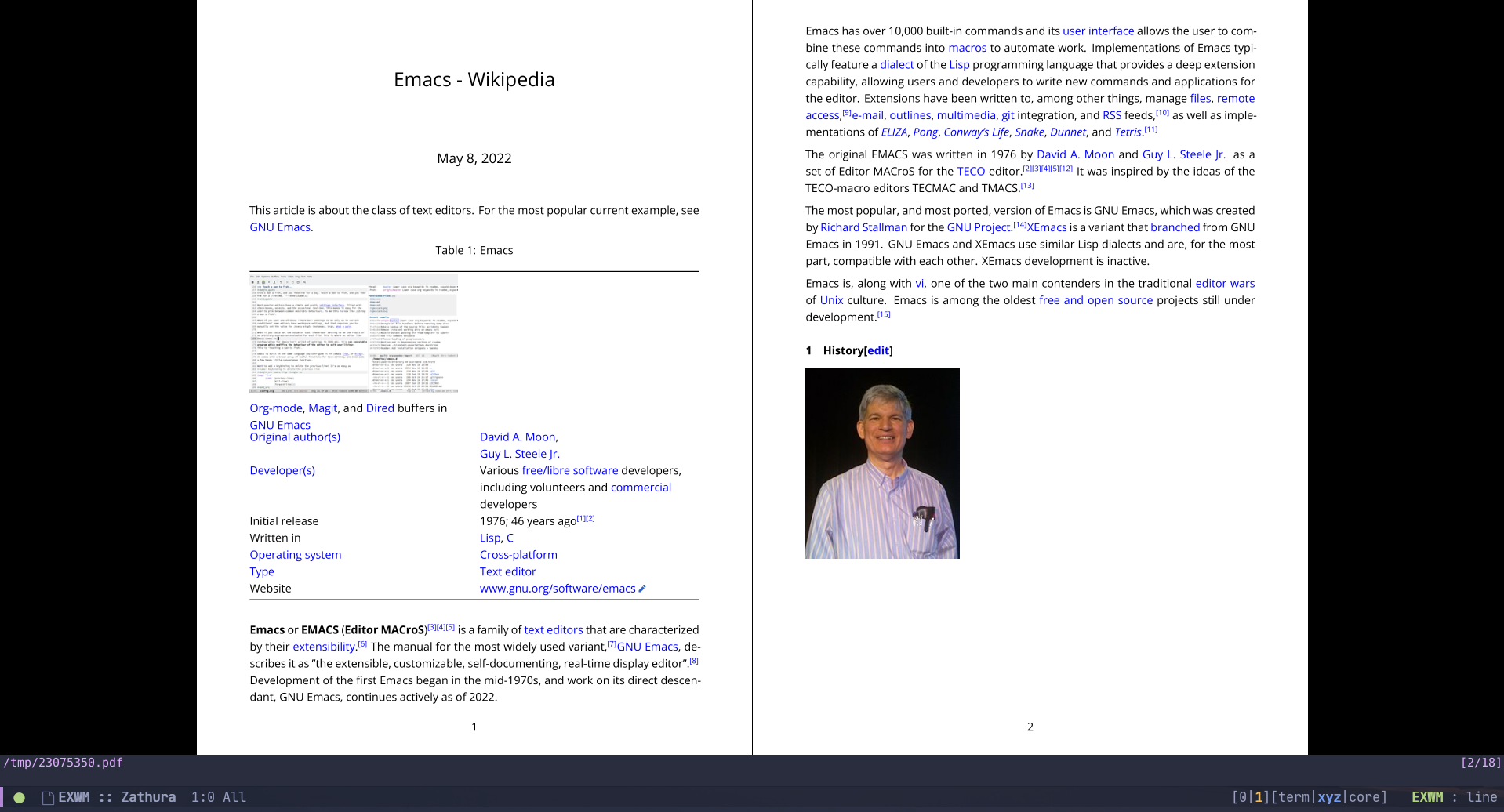
So, we can open elfeed entries in a PDF viewer, which I find much nicer to read. Given that RSS feeds generally ship with much simpler HTML than the proper websites, results usually look awesome:

Opening aritrary sites
As you might've noticed, we also can renderer arbitrary web pages with this setup, so let's go ahead and implement that:
(defun my/get-languages (url)
  (let ((main-lang "english")
        (other-lang "russian"))
    (when (string-match-p (rx ".ru") url)
      (setq main-lang "russian"
            other-lang "english"))
    (list main-lang other-lang)))

(defun my/rdrview-open (url overwrite)
  (interactive
   (let ((url (read-from-minibuffer
               "URL: "
               (if (bound-and-true-p elfeed-show-entry)
                   (elfeed-entry-link elfeed-show-entry)))))
     (when (string-empty-p url)
       (user-error "URL is empty"))
     (list url current-prefix-arg)))
  (my/rdrview-get
   url
   (lambda (res)
     (let ((data (my/rdrview-parse res))
           (langs (my/get-languages url)))
       (my/rdrview-render
        (alist-get 'content data)
        'html
        `((title . ,(alist-get 'title data))
          (subtitle . ,(alist-get 'sitename data))
          (main-lang . ,(nth 0 langs))
          (other-lang . ,(nth 1 langs)))
        (lambda (file-name)
          (start-process "xdg-open" nil "xdg-open" file-name)))))))
Unfortunately, this part doesn't work that well, so we can't just uninstall Firefox or Chromium and browse the web from a PDF viewer.
The most common problem I faced is incorrectly formed pictures, for instance .png files without the boundary info. I'm sure you've encountered this if you ever tried to insert a lot of Internet pictures to a LaTeX document.
However, sans the pictures issue, it works nicely with Wikipedia pages. For instance, here's how the Emacs page looks: