| .github/workflows | ||
| img | ||
| .gitignore | ||
| Cask | ||
| LICENSE | ||
| org-journal-tags.el | ||
| README.org | ||

org-journal-tags
A package to make sense of my life org-journal records.
The package adds the org-journal: link type to Org Mode. When placed in an org-journal file, it serves as a "tag" that references one or many paragraphs of the journal or the entire section. These tags are aggregated in the database that can be queried in various ways.
Rationale
Journal files, by their very nature, are weakly structured. One journal note can reference multiple entities (or none) and can itself be composed of multiple parts that only have in common the date and time in which they were written. Needless to say, it's hard to find anything in such records.
This package attempts to increase the accessiblity of the journal by:
- Taking advantage of the temporal data, e.g. allowing to query entries in some date range.
- Allowing to extract (and reference) only some parts of a particular journal entry.
- Compensating weak structure by a more advanced query engine.
For instance, when I'm writing down the progress on a job project, I can leave a tag like job.<project-name> in the paragraph(s) related to that project. Later, I can query only those paragraphs that are referenced by this particular tag. The query results can be then narrowed, for instance, to include the word "backend", or extended with some other tag.
If no tag fits the subject matter, the journal can be queried by regular expression, e.g. by searching some regex within a specific time frame. Subsequent searches are also significantly faster than the built-in org-journal search functionality because of caching of the journal files.
Installation
As the package isn’t yet available anywhere but in this repository, you can clone the repository, add it to the load-path and require the package. My preferred way is use use-package with straight:
(use-package org-journal-tags
  :straight (:host github :repo "SqrtMinusOne/org-journal-tags")
  :after (org-journal)
  :config
  (org-journal-tags-autosync-mode))
Basic usage
Adding tags
To add an inline tag, you can manually create a link of the following format:
[[org-journal:<tag-name>][<tag-description>]]
Or run M-x org-journal-tags-insert-tag to insert a tag with a completion interface. The description is not aggregated and thus optional.
The link will reference the current Org Mode paragraph. If you want to reference more paragraphs, you can set the number of paragraphs like this:
[[org-journal:<tag-name>::<number-of-paragraphs>][<tag-description>]]
Run M-x org-journal-tags-link-get-region-at-point to select the referenced region of the buffer.
To add a tag to the entire section, run M-x org-journal-tags-prop-set, which will create or update the Tags property in the property drawer of the current time section. This command features a notmuch-like UI, i.e. completing read for multiple entries, where +<tag> adds a tag and -<tag> deletes a tag.
Database
The package stores tags and references to these tags in a database.
org-journal-tags-autosync-mode enables synchronizing the database at the moment of saving of the org-journal buffer. You can also run the synchronization manually:
M-x org-journal-tags-process-bufferto process the current buffer.M-x org-journal-tags-db-syncto sync changed org-journal files in the filesystem.
The same mode enables saving the database on killing Emacs, but you can always run M-x org-journal-tags-db-save manually.
M-x org-journal-tags-db-unload saves and unloads the database from the memory, M-x org-journal-tags-db-reset creates a new database.
Status buffer
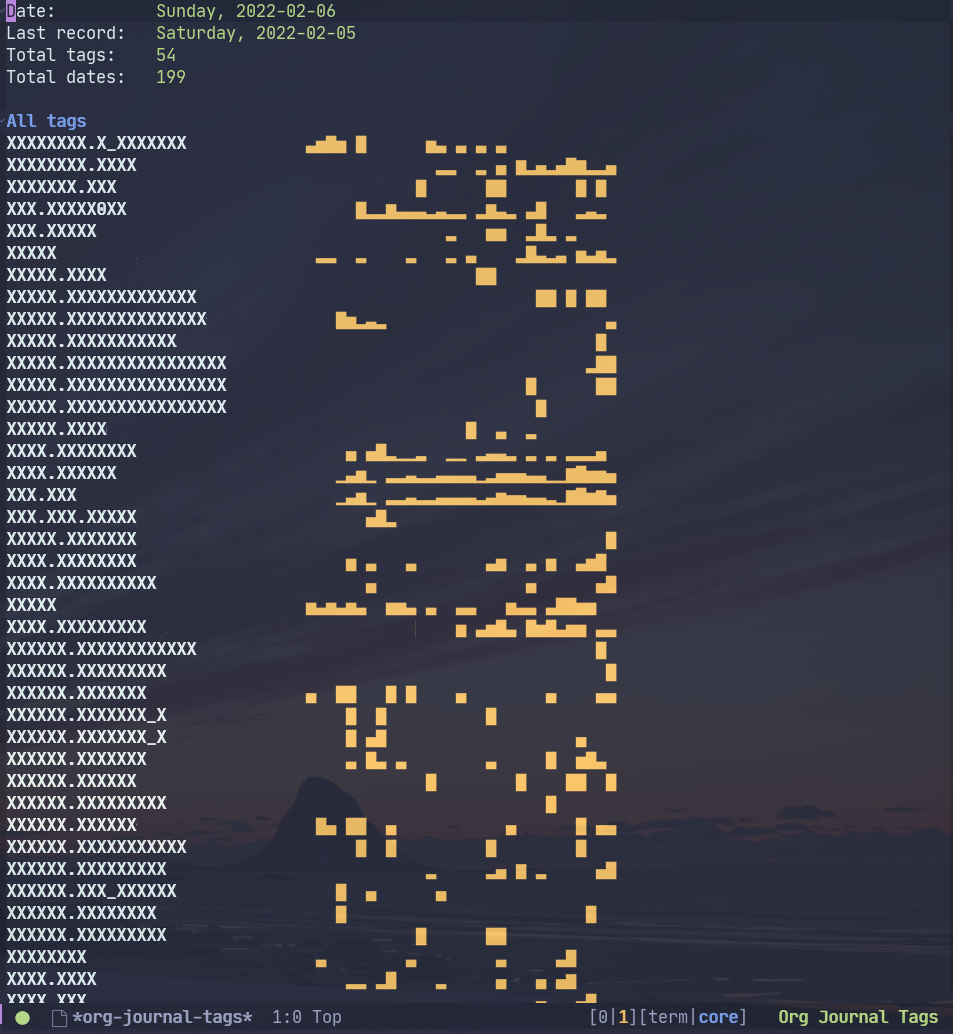
(I replaced tag names with "X" just for the screenshot)
M-x org-journal-tags-status opens the status buffer with some statistics about the journal and tags. Press ? to see the available keybindings.
Pressing RET on a tag name in the "All tags" section should open a query buffer set to return all references for this tag.
Query constructor
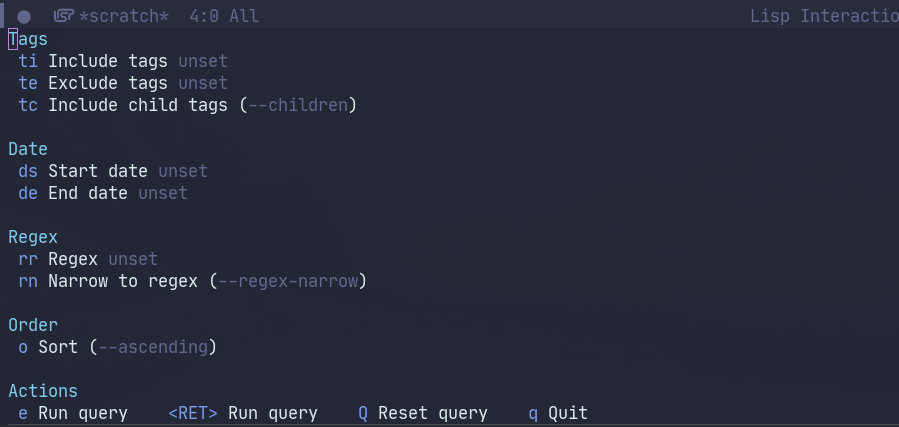
Pressing s in the status buffer or running M-x org-journal-tags-transient-query opens a transient.el buffer with query settings.
The options are as follows:
- Include tags filters the references so that each reference had at least one of these tags.
- Exclude tags filters the references so that each reference didn't have any of these tags.
- Include children includes child tags to the previous two lists.
- Start date and End date filter the references by date.
- Regex filter the references by a regular expression. It can be a string or rx expression (it just has to start with
(rxin this case). - Narrow to regex makes it so that each reference had only paragraphs that have a regex match.
- Sort sorts the result in ascending order. It's descending by default.
Pressing RET or e executes the query. Journal files are cached, so subsequent queries within one session are much faster.
Query results
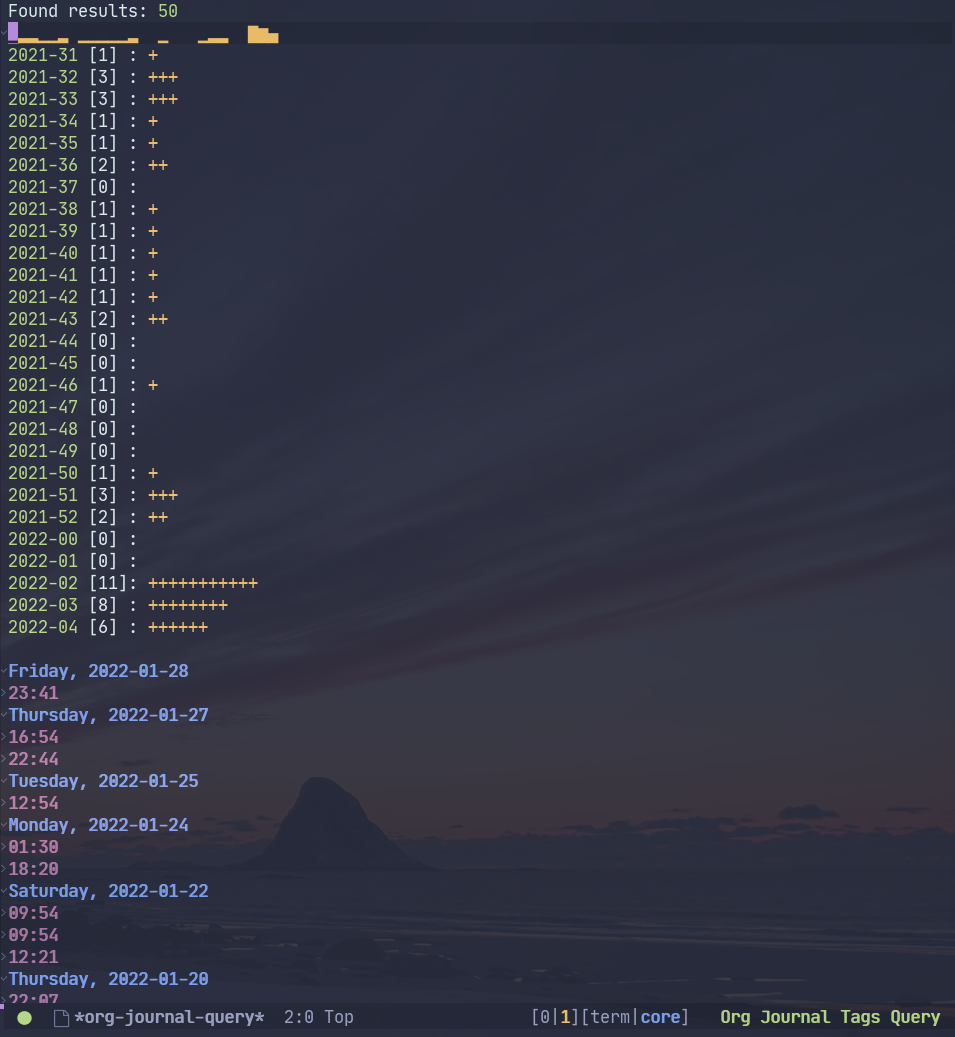
After the query completes, the package opens the results buffer. Press ? to see the available keybindings there.
Pressing RET opens the corresponding org-journal entry.
Pressing s opens the query constructor buffer. If opened from inside the query results, the query constructor has 4 additional options:
| Command | Set operation | Description |
|---|---|---|
| Union | old ∪ new | Add records of the new query to the displayed records |
| Intersection | old ∩ new | Leave only those records that are both displayed and in the new query |
| Difference from current | old \ new | Exclude records of the new query from the displayed records |
| Difference to current | new \ old | Exclude displayed records from ones of the new query |
Thus it is possible to make any query that can be described as a sequence of such set operations.
Advanced usage
Automatic tagging
org-journal provides a hook to automatically add information to the journal entries.
It can be used to automatically assign tags, for instance, based on hostname. Here's an excerpt from my configuration:
(defun my/set-journal-header ()
  (org-journal-tags-prop-apply-delta :add (list (format "host.%s" (system-name))))
  (when (boundp 'my/loc-tag)
    (org-journal-tags-prop-apply-delta :add (list my/loc-tag))))

(add-hook 'org-journal-after-entry-create-hook
          #'my/set-journal-header)
Encryption
There are two ways how org-journal can be encrypted:
- With org-crypt, by setting
org-journal-enable-encryption. - With epa, by setting
org-journal-encrypt-journal.
Both ways are supported by this package (I use the first). The decryption of entries takes some time, but this is alleviated by caching.
The cache is stored in the org-journal-tags--files-cache variable, so in principle, someone could come to your computer and inspect the value of this variable (who would ever do that?). If that's an issue, you can do something like:
(run-with-idle-timer (* 60 15) t #'org-journal-tags-cache-reset)To clear the cache on Emacs being idle after 15 minutes.
Also, as said above, org-journal-tags uses its own database, which is more like persistent cache for tags and references. You can encrypt it as well with epa by adding .gpg to the org-journal-tags-db-file variable:
(setq org-journal-tags-db-file (concat user-emacs-directory "var/org-journal-tags/index.gpg"))
The database is also stored in memory in org-journal-tags-db variable, so once again, someone could inspect the value of the variable or just run M-x org-journal-tags-status.
To avoid that, you can manually run M-x org-journal-tags-db-unload or add it to run-with-idle-timer:
(run-with-idle-timer (* 60 15) t #'org-journal-tags-db-unload)If you have everything set up correctly, encrypting a file shouldn't ask for a passphrase, so this function can be run automatically.
Advanced querying
This package provides an API for doing queries from the Lisp code.
The central function there org-journal-tags-query, which has an interface corresponding to the flags in the query constructor. Take a look at its docstring for more info.
Also, you can use some of the following operations on the set of journal references:
org-journal-tags--query-union-refs- unionorg-journal-tags--query-diff-refs- differenceorg-journal-tags--query-intersect-refs- intersectionorg-journal-tags--query-merge-refs- merge intersecting references within one setorg-journal-tags--query-sort-refs- order references by dateorg-journal-tags--string-extract-refs- collect strings corresponding to references
Final notes
This package turned out to be almost as long and complex as org-journal itself, and it also introduces some new dependencies. Hence I decided it would be better off as a separate package.
Also, I want to list some sources of inspiration. The database logic is heavily inspired by elfeed. The UI with Emacs widgets for tags & completing-read-multiple and the tagging system in general is inspired by notmuch. Finally, transient.el and magit-section are the UI packages that made this one possible, or at least much easier to implement.