| img | ||
| .gitignore | ||
| Cask | ||
| exwm-modeline.el | ||
| LICENSE | ||
| README.org | ||

exwm-modeline
A modeline segment to display exwm workspaces.
Here's how it looks near the list of perspectives (the segment of the current package is to the left):
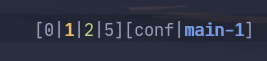
- workspaces 0 and 5 do not have any X windows
- workspace 1 is the current workspace
- workspace 2 has at least one X window.
Features:
- Supports
exwm-randrto display only workspaces related to the current monitor. - Numbers are clickable.
Installation
As the package isn't yet available anywhere but in this repository, you can clone the repository, add it to the load-path, and require the package:
(require 'exwm-modeline)
My preferred way is to use use-package with straight:
(use-package exwm-modeline
  :straight (:host github :repo "SqrtMinusOne/exwm-modeline")
  :after (exwm))
Then put a call to exwm-modeline-mode somewhere after the moment when EXWM has been initialized, for instance:
(add-hook 'exwm-init-hook #'exwm-modeline-mode)Customization
Set exwm-modeline-randr to nil to turn off filtering of workspaces by monitor.
Set exwm-modeline-short to t display only the current workspace in the modeline.
Set exwm-modeline-display-urgent to nil to turn off displaying whether a workspace has an urgent window. This will significantly decrease the number of modeline updates, which may help with performance issues.
Credits
perspective.el by @nex3 was extremely instructive on how to make a modeline segment individual to a particular frame and avoid recalculating it too often.
doom-modeline-exwm by @elken also was a source of inspiration.